Search results for: “label/Security”

  • Data Archiving Method

    I have recently begun backing up my data such as photos (both digital and film), videos, and other files so that in case something happens, I will not lose my irreplaceable data. There is always much discussion on the best ways to archive data, and I have my way. Many may agree and disagree with my method, but this one works for me.

    In this post I will explain my method, as well as the reasons I chose to use the tools and storage devices.

    Organizing and Labelling the Data

    Before I begin to archive the data, I first organize the data, as well as set some labeling standards. The archival process is much easier once you have organized all your files, photos, and whatever else you will be archiving.

    If you plan to scan photos, slides, negatives, or other documents, you should separate them into groups, either by date or people. This will help you to keep certain items together within your archives.

    Once you have organized your data, you should create a labeling scheme to make it easier for you to find the data that you need. I have decided to backup my data on DVDs (I’ll explain why below), so each DVD is stored in a jewel case with a label assigned to the case. The label contains the following:

    1. Title – I provide a descriptive title to indicate the contents of the DVD.
    2. Years – I indicate the years covered by the data on the DVD. This helps to order the DVDs in chronological order, even if they weren’t burned in that order.
    3. Created Date – The date that I created the DVD. This will come in handy in the future to determine how old the DVD is, and whether I should create a new copy of the DVD.
    4. Catalog Name – This is a unique name that I give each DVD so I can organize them. I came up with a naming convention that indicates the type of data on the DVD.
    5. Family – This field contains the last name of the family represented by the data on the DVD. This helps to find data for a specific family name.

    I also decided to use coloured jewel cases that will help indicated the data on each DVD. For example, for photos I use a black jewel case, and videos will be stored in blue cases. You can easily purchase a box of coloured jewel cases for cheap.

    Once I have organized my data, and came up with a labeling scheme, the next step is to start determining how to store the data.

    Archiving Media

    This is probably the most debated point with regards to archiving data. Many people have their opinions about which media is best. Each media type has its pros and cons, so choose one that works for you.

    I have chosen to archive my data on single-layer DVD discs. I chose this method because they are relatively affordable, can hold a lot of data and can be easily stored. When I do make an archive disc, I always make two copies, so that if one becomes corrupted in the future, then I can retrieve my data from the copy.

    I have, however, not chosen just any DVD discs to use for archiving. I have chosen to use DVD+R discs from Taiyo Yuden. The DVD+R format has several benefits over the DVD-R specification, with one of the benefits being better error management. Taiyo Yuden discs are known as very reliable discs, so I chose them for my archives.

    Just in case you are wondering where you can purchase Taiyo Yuden discs, I discovered that very few stores, if any, carry them. I ordered mine online, as most people probably do. I only know of two online stores where you can order them for those living in Canada or the United States:

    If you know where else you can purchase these DVDs, I would like to know. Be careful, however, as many places offer DVDs that say they are Taiyo Yuden, when in fact they are fakes.

    I burn the DVD using Nero, using the catalog name as the DVD name, and perform a verification after each burn to ensure that the data was written without any issues. Once the burn has completed, I print the label, and then insert the label into the jewel case with the DVD. I write the catalog name on the DVD using a water-based CD marker.

    When I’m done with my burning, I move one of the copies offsite to prevent all my archives from being destroy if something were to happen to my home.

    Many people have discussed the life of a burned DVD, and whether their data will be available in 50 years. I think that as long as the data is readable after 5 years I should be good. I’ll probably move my data to the next generation of storage media, so won’t care if these DVDs can be read in 50 years.

    Summary

    In this post I have provided an overview of my method for archiving my data. I use a simple labeling system as well as DVD+R discs to organize and store my data. For more security, and piece of mind, I also always burn at least two copies of the data, just in case one is destroyed. Finally I move one of the copies offsite to losing all archives if something were to happen.

    You can choose to follow my method, or come up with your own. You should always create a system that works best for you.
  • WordPress Paid vs. Free Themes: Which Are The Right Ones For You?

    WordPress Paid vs. Free Themes: Which Are The Right Ones For You?

    WordPress is undoubtedly one of the most powerful website engines out there. Because of its easy to use features, it takes no time for an unprofessional to build an out-of-the-box site. With this platform and a quality WordPress hosting provider, having a site up and running is not a big deal.

    With elegant and simple layout, WordPress has so much to offer to developers in order to meet both business and personal needs.

    If you are a WordPress beginner, you will be impressed with its customizable features, free themes, and so many easy DIY features. While one of the most challenging tasks is to choose a theme, however, you can check 000webhost.com if you are looking for a list of free WP themes for all kinds of different websites.

    For some, free themes are enough to develop a website, but for others, premium (paid) themes are a better choice.

    So, how do you decide which theme is right for you?

    Let’s have a look.

    Pros of free WordPress themes

    WordPress Themes

    Absolutely free. Free WordPress themes are completely free. You can download them, use them on your website and make money. No hassle and no hidden charges.

    Strict review process. These free themes tend to be bug-free and secure, all thanks to a strict review by some experts who scan and test the themes before they are added into the theme directory.

    Loads faster. Free themes come with limited features. But, it loads faster and you will get sufficient time to develop your site.

    More plugins. Because developers have to follow strict guidelines of theme review, they tend to support more plugins compared to premium themes.

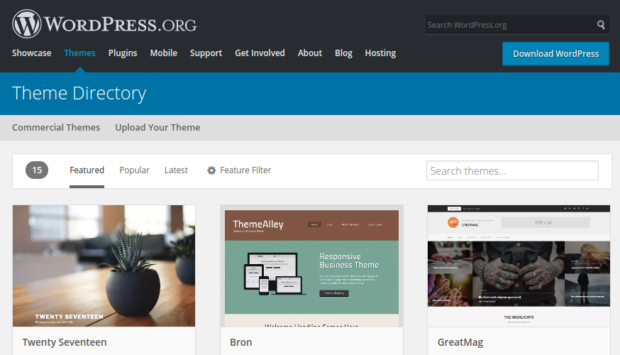
    Easy to download. These themes are easy to download. You don’t have to struggle a bit to get these themes because they are available from the WordPress dashboard.

    WordPress free themes come with ample benefits. It helps developers to learn various theme development skills because, after the theme review process, the experts suggest the changes and audits the theme’s code.

    Also, it helps the developer to build their reputation, and understanding of the basics of a WordPress theme.

    Cons of free WordPress themes

    Just like many things in life, free WordPress themes come with a few disadvantages as well. These are:

    Limited functionality and features. Most of the free WordPress themes do not provide additional features like landing buttons, using shortcodes, creating buttons etc.

    Lack of professional design. Some of the free WordPress themes look unprofessional and may implement poor navigational controls. Background colors may also not be attractive.

    Limited support options. WordPress free themes come with limited options like you can’t respond to support queries.

    Zero obligation. If you are looking for a warranty, then free themes are not for you. Right or wrong, only you are responsible for it. There could be updates to the them, though, which could fix issues.

    Not a unique design. When you check the internet, you’ll find many blogs and sites that have used the same free WordPress theme. Moreover, with free themes, you’ll get restricted options to customize the look of the theme.

    Compatibility issue. Most of the free themes have compatibility problems with plugins. Many of these problems could be related to updates to the WordPress core, that causes a conflict with the free theme that may not be updated to the changes to the WordPress core.

    To make the right choice, the first thing you should know is the difference between free and paid themes and how they differentiate from each other.

    Let’s now know more about premium or paid themes now.

    WordPress paid themes come with lots of advantages like consistent updates, theme support and much more. Here are a few pros of premium/paid WordPress theme.

    Pros of premium WordPress themes

    All kinds of support like phone, email, forum etc. Whether you are a WordPress beginner or a pro, with WordPress paid themes you will get all kinds of support that suits your needs. You can contact them via phone, email or participate in the forums, the choice is yours.

    High quality. Compared to free themes, WordPress themes are higher in terms of generating value, for creating positive feedback loop, etc.

    Advanced functionality. When you opt for a paid version of a WordPress theme, you will get access to a number of advanced functionality like Elegant themes, WooDojo plugins or even advanced admin panels. This makes site configuration and customizations much easier.

    High-quality design. A good design goes a long way and it doesn’t need any proof. From backend admin menus/pages to page templates, a high-quality design can help you to improve the productivity of your site.

    Guaranteed security. Where free WordPress themes come with a ‘at your own risk’ label, premium/paid site comes with guaranteed security to their customers.

    Cons of premium WordPress themes

    Higher price. Let’s face it, premium WordPress themes are expensive. There are chances the theme you choose can be a bit high in price, and after you bought it, you need some sort of licensing fees as well. That may become a little expensive than what you could afford.

    Don’t have any official review process. Another disadvantage of premium themes is they don’t have any official review process so they can ignore WordPress development best practices in a few areas.

    Crossing over into plugin domain. It is quite common that WordPress themes can cross over a few plugins domain and offer some features that may disappear when you change themes.

    Slow loading speed. The main aim of developers is to create more themes with irrelevant features. You may not use many of those features, but the features that you don’t use can actually slow down your website.

    To sum up

    When looking for a WordPress theme, make sure you build a website that can cater to your every need. Other than browser support, responsive design, load time, it is important for you to build a website that helps your business to stand apart.

    It’s completely fine to start with a free version of a WordPress theme and then upgrade when you think it’s the right time.

    When buying a WordPress theme, it is important to understand the pros and cons of both premium and free WordPress themes. Your selection is based on your website needs, budget as well as on the aesthetic preferences.